What is a molecule?
A molecule is a particle made of two or more atoms joined by covalent bonds. In a covalent bond, atoms share pairs of electrons. A molecule made of one kind of atom is an element (O2, N2). A molecule made of different kinds of atoms is a compound (H2O, CO2).
The number of electron pairs tells you the type of bond. The values below appear on the simulator's panel.
| Bond | Electron pairs | Example | Bond length | Bond energy |
|---|---|---|---|---|
| Single | 1 | Ethane C2H6, C–C | 0.154 nm | 348 kJ/mol |
| Double | 2 | Ethylene C2H4, C=C | 0.134 nm | 614 kJ/mol |
| Triple | 3 | Acetylene C2H2, C≡C | 0.120 nm | 839 kJ/mol |
The more electron pairs there are, the shorter and stronger the bond. But the energy does not exactly triple: a triple bond is 2.4 times as strong as a single bond.
The arrangement of the atoms determines the shape of a molecule. Water is bent (104.5°), ammonia is trigonal pyramidal (107°), methane is tetrahedral (109.5°), and carbon dioxide is linear (180°).
Molecules vs. ionic compounds
The list also includes ionic compounds such as NaCl, MgO, and KOH. The simulator draws ionic attraction as a dashed line. Ionic compounds do not form separate molecules: the ions alternate in a crystal lattice. The formula shows only the ratio of the ions.
Build your molecule in the Nalukh chem app
Add atoms and see the structure, bond length, and energy of 32 compounds. This simulator is included with full access. Downloading is free, and 2 units and 5 simulators are open without signing up.
How do you use the simulator?
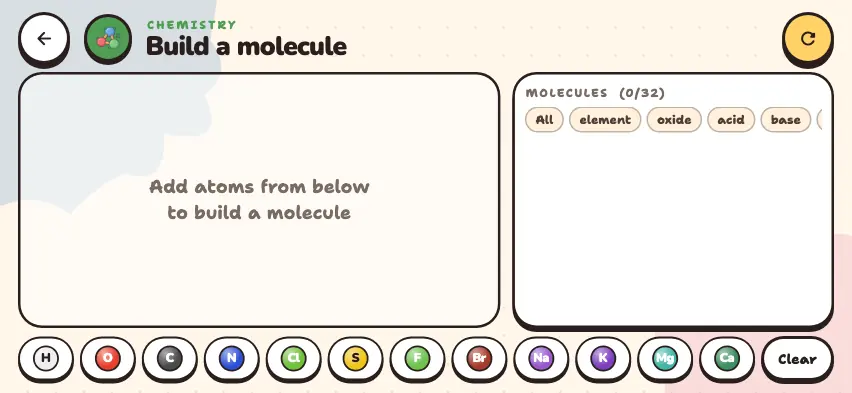
- Use the atom buttons in the bottom row to add atoms: H, O, C, N, Cl, S, F, Br, Na, K, Mg, Ca. Each press adds one atom, and the order does not matter.
- When the atom count exactly matches a compound on the list, a structural drawing appears. The green panel shows the name, formula, bond type, shape, bond length, energy, melting point, and boiling point.
- If there is no match, you see Not a molecule yet — add/remove atoms (tap to remove). Press an extra atom to remove it.
- To start a different molecule, press the Clear button.
- In the list on the right, each compound you build gets a green mark and moves to the top. Use the filter at the top to choose All, element, oxides, acids, bases, salts, or organic compounds.
Tasks to try in the simulator
- Press C, C, H, H to build C2H2. Then press the H button 2 times to make C2H4, and 2 more times to make C2H6. The bond length grows from 0.120 to 0.154 nm, and the energy falls from 839 to 348 kJ/mol.
- Build H2O and add O. You get H2O2, and the boiling point changes from 100°C to 150°C.
- Build NaCl and MgO and compare their melting points: 801°C and 2852°C. To learn why, read about Coulomb's law.
- How many compounds can you build using only C and H? The answer is 5: CH4, C2H6, C2H4, C2H2, C3H4.