The Coulomb's law formula
The force between two charges is directly proportional to the product of the charges and inversely proportional to the square of the distance:
F = k · |q₁ · q₂| / r²
- F: force, in newtons (N)
- k: 8.99 × 10⁹ N·m²/C²
- q₁, q₂: size of each charge, in coulombs (C)
- r: distance between the charges, in meters (m)
In the formula, use the size of each charge without its sign. The signs give the direction: the same sign means repulsion, and opposite signs mean attraction.
| Change | Force |
|---|---|
| Multiply one charge by 2 | Multiplied by 2 |
| Multiply both charges by 2 | Multiplied by 4 |
| Multiply the distance by 2 | Divided by 4 |
| Multiply the distance by 3 | Divided by 9 |
Worked example
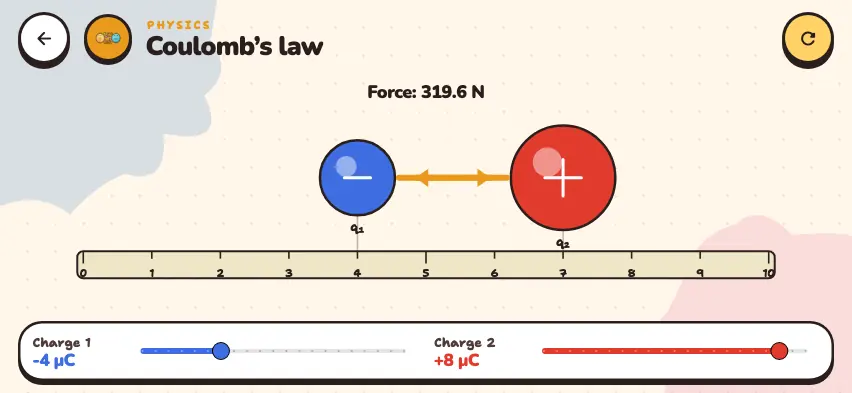
q₁ = −4 µC, q₂ = +8 µC, distance 3 cm. First convert the units: 1 µC = 10⁻⁶ C, 3 cm = 0.03 m.
F = 8.99 × 10⁹ × (4 × 10⁻⁶ × 8 × 10⁻⁶) / 0.03² = 319.6 N
The charges have opposite signs, so they attract. The simulator shows exactly this value when it starts.
Why does it matter in chemistry?
An ionic bond is the attraction between oppositely charged ions. The larger the ion charges and the smaller the distance, the stronger the attraction. Mg2+ and O2− ions have a double charge, so MgO melts at 2852°C. Na+ and Cl− ions have a single charge, so NaCl melts at 801°C.
The same is true in an atom: electrons in the outer shell are far from the nucleus, so they are held weakly and come off easily.
Try Coulomb's law in the Nalukh chem app
Drag the charges along the line and see how the force changes. This simulator is included with full access. Downloading is free, and 2 units and 5 simulators are open without signing up.
How do you use the simulator?
- Drag the q₁ and q₂ charges with your finger along the 0–10 cm line to change the distance. The charges cannot get closer than 0.8 cm.
- Use the Charge 1 and Charge 2 sliders to change each charge from −10 to +10 µC in steps of 1 µC. A negative charge is blue, a positive charge is red, and a zero charge is gray. The larger the charge, the larger the ball.
- Read the force in newtons from the text at the top.
- Watch the orange arrows. If the arrows point toward each other, the force is attractive. If they point outward, the force is repulsive. The force on each charge has the same size, so the arrows have the same length.
Tasks to try in the simulator
- From the starting position, drag q₁ to the 1 cm mark. The distance becomes 6 cm, which is 2 times larger. The force goes from 319.6 N to about 80 N, so it is divided by 4.
- Set Charge 1 to −8 µC. The force doubles to 639.3 N.
- Set Charge 1 to +4 µC. The size of the force stays the same, but the arrows point outward.
- Set Charge 2 to 0. The force becomes 0.00 N, and the arrows disappear.
Common mistakes
- Using the distance in centimeters. In the formula, the distance must be in meters.
- Forgetting to square the distance. When the distance is multiplied by 2, the force is divided by 4, not by 2.