How do you write a chemical formula?
Ionic compounds are neutral: the total positive charge of the cations equals the total negative charge of the anions. The subscripts in a formula keep this balance. The easiest way to find the subscripts is the criss-cross method.
- Write the two ions with their charges: Al3+ and O2−.
- Cross the charge numbers to make subscripts: aluminum gets a subscript of 2 and oxygen gets a subscript of 3, which gives Al2O3.
- If the subscripts share a common factor, reduce them to the smallest whole numbers: the ions Mg2+ and O2− give MgO, not Mg2O2.
- Do not write a subscript of 1.
- If a formula needs more than one of a polyatomic ion, put that ion in parentheses: Ca(OH)2, Fe2(SO4)3.
| Cation | Anion | Formula | Total charge | Name |
|---|---|---|---|---|
| Na+ | Cl− | NaCl | 1+ and 1− | sodium chloride |
| Mg2+ | O2− | MgO | 2+ and 2− | magnesium oxide |
| Al3+ | O2− | Al2O3 | 6+ and 6− | aluminum oxide |
| Ca2+ | OH− | Ca(OH)2 | 2+ and 2− | calcium hydroxide |
| Fe3+ | SO₄²⁻ | Fe2(SO4)3 | 6+ and 6− | iron(III) sulfate |
| Ca2+ | PO₄³⁻ | Ca3(PO4)2 | 6+ and 6− | calcium phosphate |
Build your formulas in the Nalukh chem app
This simulator unlocks with full access. The app is free to download, and 2 units and 5 simulators are open without signing up.
How do you use the simulator?
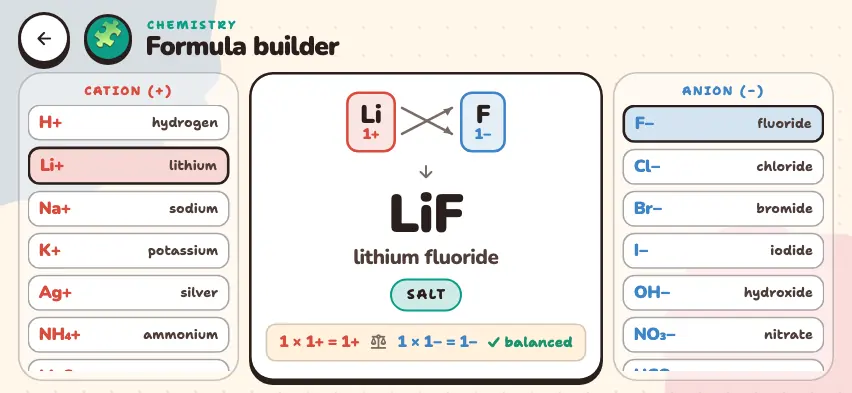
When the simulator opens, Li+ and F− are selected.
- Choose a cation from the CATION (+) column on the left. Iron has two rows: Fe2+ and Fe3+.
- Choose an anion from the ANION (−) column on the right.
- The top of the center panel shows the charges of the two ions, with arrows crossing them.
- Below that, you see the formula, the name of the compound, and its class: oxide, base, acid, salt, or water.
- The bottom line checks the charges. For Al2O3, it shows 2 × 3+ = 6+ and 3 × 2− = 6−, with ✓ balanced next to them.
Tasks to try in the simulator
Write your formula in your notebook first, then check it against the simulator.
- Write the formula for Mg2+ and the nitride ion N3−. Answer: Mg3N2, with total charges of 6+ and 6−.
- Pair Fe2+ and then Fe3+ with the sulfate ion. Answer: FeSO4 is iron(II) sulfate, and Fe2(SO4)3 is iron(III) sulfate.
- Write the formula for ammonium NH₄⁺ and sulfate SO₄²⁻. Why do parentheses appear? Answer: (NH4)2SO4, because the formula has two ammonium ions.
- Set the cation to hydrogen, then change the anion to chloride, sulfate, and phosphate. Answer: HCl, H2SO4, and H3PO4, and the class is acid.
Common mistakes
- Forgetting to reduce subscripts. The ions Ca2+ and O2− give CaO, not Ca2O2.
- Leaving out parentheses. Ca(OH)2 has two OH− ions. Writing CaOH2 is wrong.
- Changing the subscript inside an ion. The 4 in SO₄²⁻ is part of the ion itself, so it stays the same.
- Assuming every charge-balanced formula is a real substance. The simulator only counts charges. For example, the charges in Al2(CO3)3 balance, but this substance breaks down in water.