What is reaction rate?
Reaction rate tells how much the concentration of a substance changes per unit of time. Some textbooks write it with the letter υ: υ = ΔC ÷ Δt. The unit is mol/(L·s).
For a reaction to happen, particles must collide. But not every collision leads to a reaction: a particle needs more energy than the activation energy. Activation energy is the minimum energy needed for a reaction to start.
| Factor | What changes? | Example |
|---|---|---|
| Temperature | Particles move faster and collide harder | Milk sours slowly in the refrigerator |
| Concentration | More particles per unit volume, so more collisions | The more concentrated the hydrochloric acid, the faster zinc dissolves |
| Surface area | The surface available for collisions gets larger | Powdered limestone reacts faster than a solid lump |
| Catalyst | Activation energy is lowered | MnO2 speeds up the decomposition of hydrogen peroxide |
A catalyst itself remains unchanged after the reaction. An inhibitor does the opposite and slows a reaction: inhibitors are used to slow the rusting of iron.
By van 't Hoff's rule, the rate of many reactions increases 2 to 4 times when the temperature rises by 10°C. For example, if the temperature coefficient is 2, a 30°C rise makes the rate 2³ = 8 times greater.
Test reaction rate in the Nalukh chem app
This simulator is part of full access. The app is free to download, and 2 chapters and 5 simulators are open without sign-up.
How do you use the simulator?
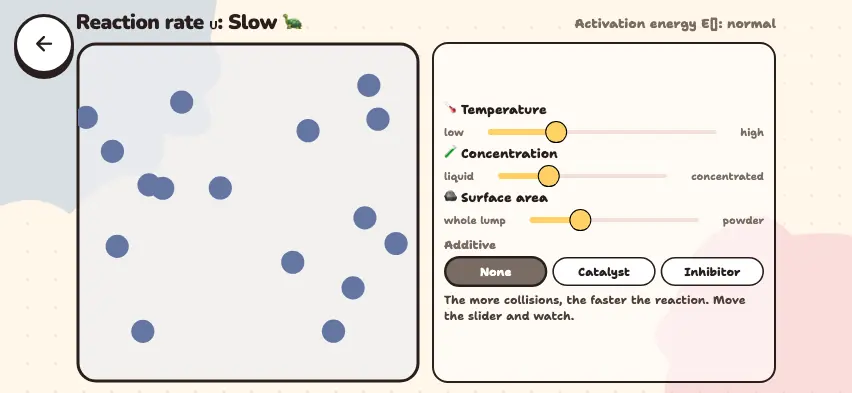
Particles move in the box on the left. The top line shows the rate as Slow 🐢, Medium, or Fast 🔥.
- Drag the 🌡️ Temperature slider to the right: the particles move faster.
- Drag the 🧪 Concentration slider toward concentrated: there are more particles.
- Drag the 🪨 Surface area slider toward powder: the particles get smaller.
- In the Additive section, choose the None, Catalyst, or Inhibitor button. A catalyst is drawn as green dots, and an inhibitor as red crosses.
- The top right line shows how the activation energy changes. As the rate rises, the particles change color from blue to red.
Tasks to try in the simulator
When the simulator opens, the rate is Slow 🐢.
- Drag just one slider all the way to the right. Which one makes the rate Fast 🔥? Answer: None of them. Each of the three raises the rate only to Medium.
- With no additive, how many sliders must you move to reach Fast 🔥? Answer: All three. With two sliders all the way to the right, the rate stays at Medium.
- Choose Catalyst and drag only the temperature slider all the way to the right. Answer: The rate becomes Fast 🔥.
- Choose Inhibitor and drag all three sliders all the way to the right. Answer: The rate stays at Medium.
The simulator shows the rate in three levels, not as a number. The sliders are for comparing factors. They are not measurements of a real reaction.
Everyday and industrial examples
- Keeping food in the refrigerator slows the reactions that spoil it.
- In sulfuric acid plants, a V2O5 catalyst speeds up the reaction that turns SO2 into SO3.
- Grinding a solid into powder makes its surface larger, so the reaction goes faster.