What is a molecular model?
Molecules cannot be seen with the naked eye, so their shapes are shown with models. School lessons use two models the most.
| Feature | Ball-and-stick | Space-filling |
|---|---|---|
| Atoms | separate balls | large balls that overlap neighboring atoms |
| Bonds | one stick for a single bond, two for a double bond, three for a triple bond | not visible |
| Angles | easy to see | hard to read |
| Best for | number of bonds, molecular shape | outer shape of the molecule, space it takes up |
The more bonds there are between two atoms, the closer the atoms are and the stronger the bond. You can see this in three compounds with two carbon atoms:
| Compound | Bond | Length | Strength |
|---|---|---|---|
| Ethane C2H6 | C–C single | 0.154 nm | 348 kJ/mol |
| Ethylene C2H4 | C=C double | 0.134 nm | 614 kJ/mol |
| Acetylene C2H2 | C≡C triple | 0.120 nm | 839 kJ/mol |
Choose a compound and switch models
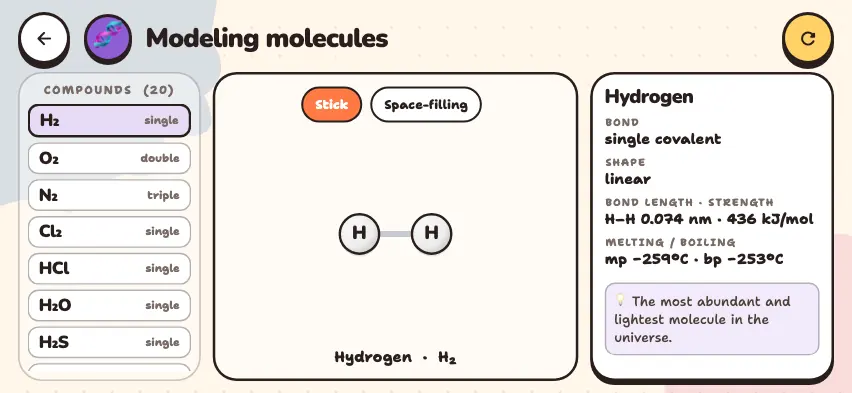
Choose a compound, switch between the two models, and see the angles and bond lengths. This simulator is part of full access. The app is free to download, and 2 chapters and 5 simulators are open without sign-up.
How do you use the simulator?
- Choose a compound from the list on the left. Each compound has its bond type written next to it: single, double, triple, or ionic.
- In Stick mode, look at the atoms and sticks. Ionic bonds are drawn with dashed lines instead of sticks, and ion charges are shown with small symbols.
- Press the Space-filling button. The sticks disappear, and the atoms grow and overlap each other.
- When you choose a compound with an angle, an Angle button appears in Stick mode. Use it to turn the angle arc on and off.
- Read the Bond, Shape, Angle, Bond length · strength, and Melting / boiling information on the right panel.
Tasks to try in the simulator
- Compare CO2 and SO2. Both have three atoms. Answer: CO2 is linear, 180°. SO2 is bent, 119°, because sulfur has a lone pair of electrons.
- Find the angles in H2O and H2S. Answer: 104.5° and 92°.
- Compare the bond strengths of H2, O2, and N2. Answer: 436, 498, and 945 kJ/mol. These are a single, a double, and a triple bond, in that order.
- Choose NaCl and look for a stick. Answer: There is no stick. Ions do not share electrons. They attract each other through their opposite charges, so they are joined by a dashed line.
Things to watch for when reading molecular models
- The picture is flat. The simulator draws molecules on a flat surface, and you cannot rotate them. CH4 is drawn as a cross, but the real molecule is tetrahedral, and its angle is 109.5°, not 90°. So no angle arc is drawn for this compound, and you read the value from the panel.
- Ionic compounds are not molecules. For NaCl, NaOH, and MgCl2, the simulator draws only the ions in one formula. In a real crystal, a very large number of ions are arranged in a lattice.
- Atom sizes are approximate. In the simulator, hydrogen is drawn small, and the other atoms are all drawn the same size. In reality, a chlorine atom is larger than an oxygen atom.
To learn to draw dots and bonds on paper, see the Lewis dot structures guide.