What is density?
Density tells you how much mass fits in one unit of volume. The formula is ρ = m ÷ V, where ρ is density, m is mass, and V is volume.
For example, if 2 L of aluminum has a mass of 5.4 kg, its density is 5.4 ÷ 2 = 2.7 kg/L. The units are related like this: 1 kg/L = 1 g/cm³ = 1000 kg/m³.
Density is a property of a substance. A small piece and a large piece of the same substance have the same density, so you can use density to identify a substance.
| Material | Density, kg/L | In water |
|---|---|---|
| Wood | 0.5 | floats |
| Ice | 0.92 | floats |
| Plastic | 1.3 | sinks |
| Glass | 2.5 | sinks |
| Aluminum | 2.7 | sinks |
| Iron | 7.87 | sinks |
| Copper | 8.96 | sinks |
| Gold | 19.3 | sinks |
The table shows the values used in the simulator. In reality, the density of wood and plastic depends on the type.
Why do objects float or sink?
Density, not mass, decides whether an object floats or sinks. An object less dense than water floats, and an object denser than water sinks. The denser a floating object is, the more of it sits under water: 50 percent of wood and 92 percent of ice.
Make your own block and test its density
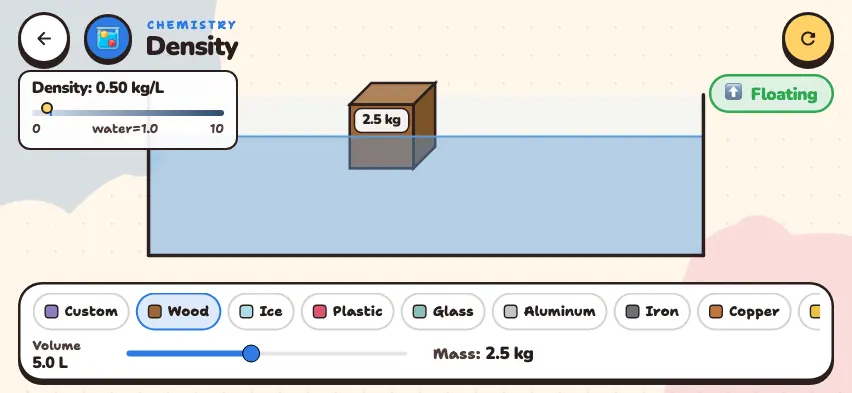
Choose a material, change the volume and mass, and see whether the block floats or sinks. This simulator is included with full access. Downloading is free, and 2 units and 5 simulators are open without signing up.
How do you use the simulator?
- Choose a material in the bottom row. Scroll the row sideways to find Copper and Gold. When you change the material, the volume goes back to 5 L.
- Move the Volume slider between 1 and 10 L. The block gets bigger or smaller. The Mass is calculated automatically.
- On the upper-left panel, read the density in kg/L and its position on a 0–10 scale. Gold has a density of 19.3, so the marker stops at the end of the scale.
- If you choose the Custom material, you set the mass yourself between 0.5 and 10 kg. The simulator calculates the density.
- The label in the upper right shows ⬆ Floating or ⬇ Sinking.
Tasks to try in the simulator
- Choose Wood and change the volume from 5 L to 10 L. Answer: The mass goes from 2.5 kg to 5 kg, and the density stays at 0.50 kg/L.
- Set the Custom block to 10 L and 9 kg, then to 1 L and 2 kg. Answer: The 9 kg block has a density of 0.90, so it floats. The 2 kg block has a density of 2.00, so it sinks. The heavy block floats, and the light block sinks.
- Set the volume of the Custom block to 5 L and increase the mass. Answer: As soon as the mass goes above 5 kg and the density goes above 1.0, the block sinks.
- Compare Wood and Ice. Answer: Both float. Half of the wood is under water, and almost all of the ice is under water.
Why does ice float, and why doesn't an iron ship sink?
- Ice floats on water. When water freezes, its volume increases and its density decreases. That is why a lake freezes from the top, and liquid water stays under the ice.
- An iron ship does not sink. Iron is denser than water, but a ship has a lot of air inside. If you divide the total mass of the ship by its total volume, you get a density lower than that of water.