What are the properties of gases?
Gas particles are far apart and move fast. The main properties of gases come from this:
- A gas has no shape of its own and fills its whole container.
- There is a lot of space between the particles, so a gas is easy to compress.
- Particles hit the walls of the container and create pressure.
What does gas pressure depend on?
Pressure depends on how many particles hit the walls and how hard they hit.
| What you change | What happens to the particles | Pressure |
|---|---|---|
| Add particles | More particles hit the walls | increases |
| Heat the gas | Particles move faster and hit the walls more often and harder | increases |
| Decrease the volume | Particles are closer to the walls and hit them more often | increases |
The three factors combine in one formula: PV = nRT. Here P is pressure, V is volume, n is the amount of substance, T is the temperature in kelvins, and R is the gas constant.
The simulator uses an ideal gas model: particles do not interact with each other and only bounce off the walls. The number on the gauge is not a real measurement. It is a value scaled for the screen. Compare how many times higher or lower the pressure gets.
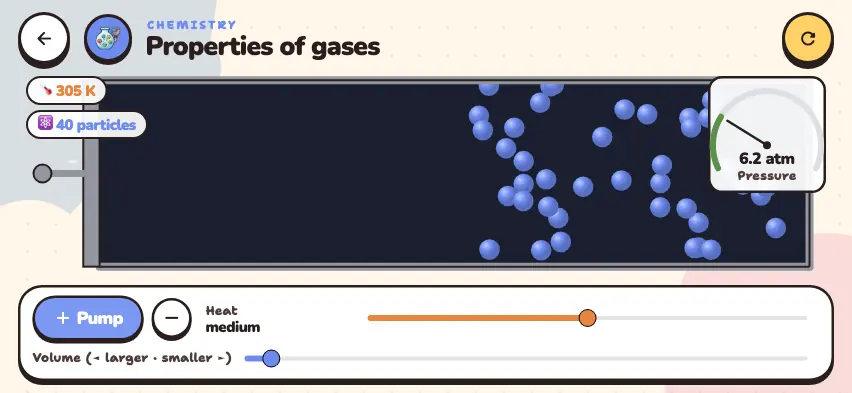
Change the pressure yourself
Add particles, heat the gas, squeeze the container, and watch the pressure gauge. This simulator is included with full access. Downloading is free, and 2 units and 5 simulators are open without signing up.
How do you use the simulator?
- Read the temperature and number of particles on the upper-left label, and read Pressure on the upper-right gauge.
- Each tap of the Pump button adds 8 particles. The round button with a minus sign removes 8 particles. The maximum is 160 particles.
- Use the Heat slider to change the speed of the particles. Its label changes to cold, medium, or hot.
- Use the Volume (◄ larger · smaller ►) slider to move the left wall. Moving the slider to the right decreases the volume.
- After you change a value, wait a few seconds and then read the pressure. The number changes up and down a little.
Tasks to try in the simulator
- Tap the Pump button 5 times to go from 40 particles to 80. Answer: The pressure doubles, from about 10 atm to about 20 atm. The temperature stays at 305 K.
- Use the Heat slider to set the temperature to 300 K and then to 600 K. Answer: The pressure goes from about 10 atm to about 20 atm. When the temperature in kelvins doubles, the pressure doubles.
- From the starting state, set the volume to the smallest value. Answer: The volume is almost cut in half, and the pressure reaches about 19 atm. The temperature does not change.
Everyday examples of gas pressure
- Pumping up a tire. A pump adds particles, so the pressure inside the tire increases.
- Cold winter weather. In the cold, particles move slowly and hit the walls with less force. So the pressure in car tires drops.
To see the laws with their formulas, read the gas laws guide.