What holds the nucleus together?
The protons in a nucleus are all positive, so they repel each other. But the nucleus does not break apart, because the nuclear force binds the protons and neutrons together. This force acts over very short distances and is much stronger than the electric repulsion. Neutrons have no charge, so they add no repulsion, but they do add nuclear force.
That is why the ratio of protons to neutrons matters. In light elements, the two numbers are close: 6 and 6 in carbon-12, 7 and 7 in nitrogen-14. Heavy elements have more neutrons: iron-56 has 26 protons and 30 neutrons.
Why do nuclei decay?
A nucleus with an unbalanced ratio is unstable and decays over time.
| Decay | What happens in the nucleus | Protons | Neutrons | Mass number |
|---|---|---|---|---|
| β⁻ | A neutron becomes a proton, and an electron is emitted | +1 | −1 | Unchanged |
| β⁺ | A proton becomes a neutron, and a positron is emitted | −1 | +1 | Unchanged |
| Proton emission | A proton leaves the nucleus | −1 | 0 | −1 |
| Neutron emission | A neutron leaves the nucleus | 0 | −1 | −1 |
For example, carbon-14 becomes nitrogen-14 by β⁻ decay. Its half-life is 5730 years, so it is used to find the age of ancient wood and bone. Oxygen-15 becomes nitrogen-15 by β⁺ decay.
Build your nucleus in the Nalukh chem app
Add protons and neutrons and see on the chart whether the nucleus is stable. This simulator is included with full access. Downloading is free, and 2 units and 5 simulators are open without signing up.
How do you use the simulator?
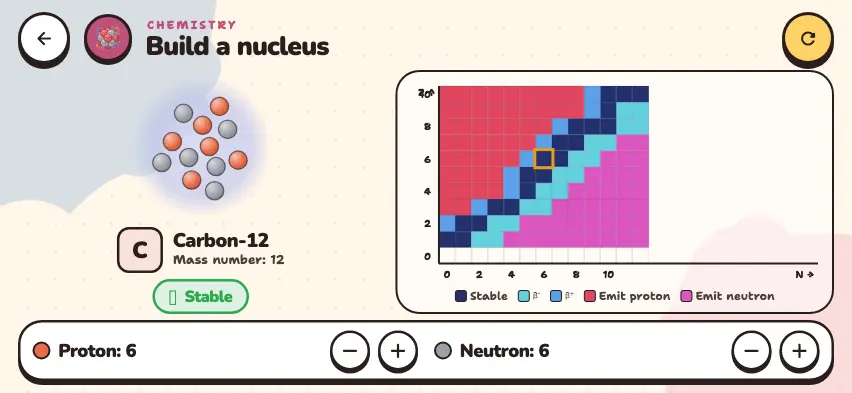
- Build the nucleus with the + and − buttons in the Proton and Neutron rows of the bottom panel. The simulator starts at carbon-12. You can go up to 10 protons and up to 12 neutrons.
- The left side shows a picture of the nucleus, the element name, and the mass number. If there are 0 protons, it says No nucleus.
- Read the label under the picture: Stable, β⁻ decay, β⁺ decay, Proton emission, or Neutron emission.
- Look at the chart of nuclides on the right. The horizontal axis N is the number of neutrons, and the vertical axis Z is the number of protons. Dark blue cells are stable nuclei, and the other colors show the type of decay. The orange frame marks your nucleus.
Tasks to try in the simulator
- The simulator does not show decay on its own, so do it by hand. Set 6 protons and 8 neutrons: this is carbon-14, β⁻ decay. Remove one neutron and add one proton. You get nitrogen-14, and the label changes to Stable.
- Set 6 protons and 5 neutrons: this is carbon-11, β⁺ decay. Remove one proton and add one neutron. You get boron-11, and the label changes to Stable.
- Count the dark blue cells on the chart. The first 10 elements have 20 stable nuclei.
- Is a nucleus with equal numbers of protons and neutrons always stable? Set 4 protons and 4 neutrons to check. Beryllium-8 is unstable.