Two key industrial processes
| Process | Main reaction | Optimal conditions |
|---|---|---|
| Haber process | N2 + 3H2 ⇌ 2NH3 | iron catalyst, 450 °C, 300 bar |
| Contact process | 2SO2 + O2 ⇌ 2SO3 | V2O5 catalyst, 450 °C, 1–2 atm |
Both reactions are reversible and exothermic, and the number of moles of gas decreases as they proceed. So changing the conditions affects both reactions in the same way.
Why are these conditions chosen?
| Change | Yield | Rate |
|---|---|---|
| Raise the temperature | falls | rises |
| Raise the pressure | rises | rises |
| Add a catalyst | does not change | rises |
At low temperature the yield is high, but the reaction is too slow. So a middle condition of about 450 °C is chosen. The Haber process needs high pressure, but in the contact process the yield reaches 99.5% at just 1–2 atm, so raising the pressure is expensive and unnecessary.
At the end of the contact process, SO3 is not absorbed directly in water, because that forms an acid mist. It is first absorbed in concentrated sulfuric acid to make oleum H2S2O7, and then diluted with water.
In real plants the pressure varies, and the Haber process may also use about 200 atm. In one pass, only about 15% of the nitrogen and hydrogen becomes ammonia, but the unreacted gas is sent back in, which brings the total to about 98%. The yield numbers in the simulator come from a model that shows the effects, so they are not the same as these real numbers.
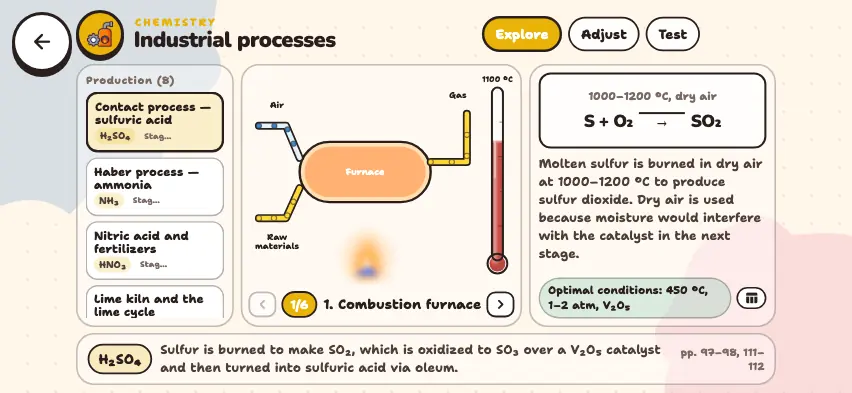
Adjust the process conditions in the Nalukh chem app
Change the temperature and pressure and compare yield and rate. This simulator is included with full access. The app is free to download, and 2 units and 5 simulators are open with no sign-up.
How do you use the simulator?
- Tap a process in the list on the left. There are 8 processes: sulfuric acid, ammonia, nitric acid, lime, cement, steel, zinc, and sulfur.
- In Explore mode, use the left and right arrows in the center panel to move through the stages. The conditions, equation, and explanation appear on the right. A stage with no reaction is labeled Physical stage.
- In Adjust mode, choose the Haber process or the contact process. This mode does not work for the other six processes.
- Move the Temperature and Pressure sliders, and press the catalyst button to turn it on or off. Yield and Rate change right away. The Optimal button returns to the starting conditions.
- Test mode has 6 questions: ordering the stages, choosing conditions, and identifying reactions.
Tasks to try in the simulator
- From the Optimal conditions of the Haber process, set the temperature to about 350 °C. Watch Yield rise and Rate fall. Why do plants not choose a low temperature?
- Turn off the catalyst button. Yield stays the same, and Rate falls sharply.
- In the contact process, set the temperature to 550 °C. The yield falls from 99.5% to 88%.
- In Explore mode, go through the blast furnace stages and find what reduces hematite. Answer: carbon monoxide, CO.