What is electron configuration?
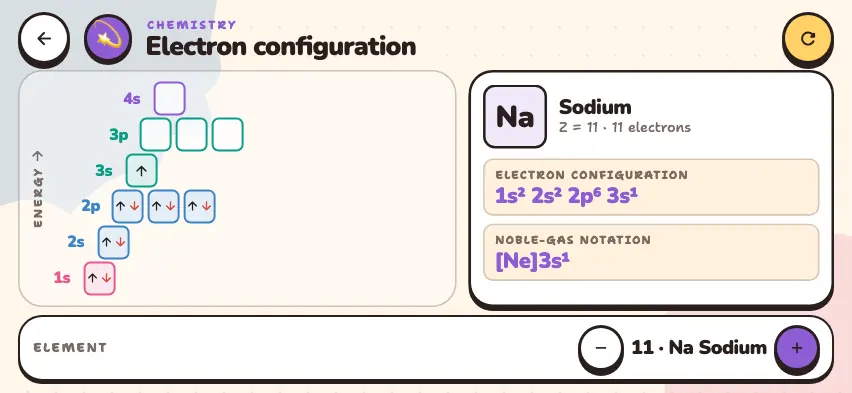
An electron configuration is a notation that shows how many electrons sit in each shell and subshell of an atom. The configuration of sodium is written 1s²2s²2p⁶3s¹. The first number is the shell number, the letter is the subshell, and the superscript is the number of electrons there. The sum of the superscripts (2 + 2 + 6 + 1 = 11) equals the total number of electrons in the atom.
| Subshell | Number of orbitals | Maximum electrons |
|---|---|---|
| s | 1 | 2 |
| p | 3 | 6 |
| d | 5 | 10 |
| f | 7 | 14 |
This simulator shows the subshells from 1s to 4s. In the first 20 elements, no electrons go into the d and f subshells.
Three rules for filling orbitals
- Aufbau principle: electrons fill the lowest-energy orbitals first: 1s, 2s, 2p, 3s, 3p, 4s, 3d.
- Pauli exclusion principle: one orbital holds at most 2 electrons, and they have opposite spins (↑↓).
- Hund's rule: in orbitals of equal energy, electrons first go in one at a time, and then they pair up.
In potassium and calcium, the 19th and 20th electrons go into 4s, not 3d, because 4s has lower energy than 3d.
In noble-gas notation, the symbol of the previous noble gas replaces the inner electrons: sodium is [Ne]3s¹, and potassium is [Ar]4s¹.
Watch orbitals fill in the Nalukh chem app
Choose an element and compare its orbital diagram with its full and noble-gas notation. This simulator is included with full access. Downloading is free, and 2 units and 5 simulators are open without signing up.
How do you use the simulator?
- The simulator opens on sodium. Use the − and + buttons in the ELEMENT section of the bottom row to choose an element with a number from 1 to 20.
- In the diagram on the left, each square box is one orbital, and each arrow is one electron. Energy increases as you go up the ENERGY axis.
- The right panel shows the name of the element, the number of electrons, the full notation, and the NOBLE-GAS NOTATION.
- On a phone, scroll down the panel to the ELECTRONS PER SHELL section to see the number of electrons in each shell. For sodium, it is 2, 8, 1.
- The yellow button in the header returns to hydrogen.
Tasks to try in the simulator
- Use the + button to go from nitrogen to oxygen. What changes in 2p? Answer: Nitrogen has one ↑ in each of the three boxes, and oxygen adds a ↓ in the first box to form a pair.
- Go from argon to potassium. Where does the 19th electron go? Answer: Into 4s, and the noble-gas notation is [Ar]4s¹.
- Compare the noble-gas notation of fluorine and chlorine. Answer: [He]2s²2p⁵ and [Ne]3s²3p⁵. Both have 7 electrons in the outer shell, so they are in the same group.
Common mistakes
- Forgetting Hund's rule. Writing the 2p⁴ of oxygen as ↑↓ ↑↓ is wrong. The correct form is ↑↓ ↑ ↑.
- Not checking the superscripts. When you finish, add the superscripts and compare the sum with the atomic number.
- Taking the wrong noble gas. Use the noble gas that comes before the element: [Ne] for chlorine and [Ar] for potassium.
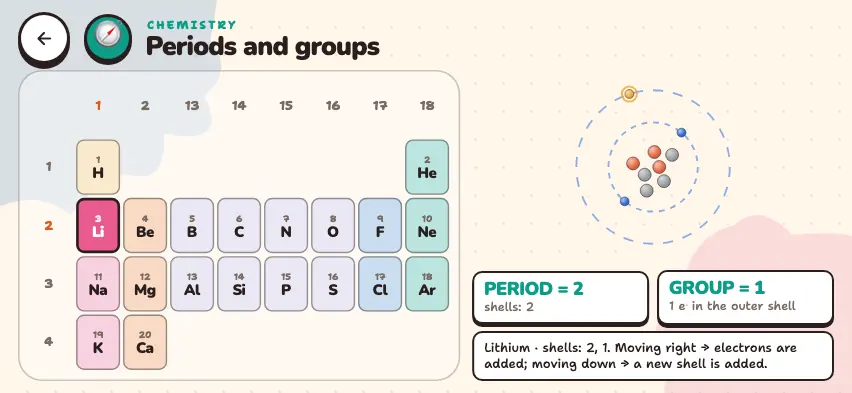
The number of electrons in the outer shell tells you the position of an element. To see this connection, read the periods and groups guide.