What is concentration?
A solution is a uniform mixture of a solvent and a solute. Concentration tells you how much solute is in a given volume of solution. The simulator measures concentration in mol/L: it shows how many moles of substance are in 1 liter of solution. For the calculation formula, see the article on molarity.
When you add sugar to tea, the tea gets sweeter. When you add water, the taste gets weaker. These are changes in concentration.
| Action | Amount of solute | Volume | Concentration |
|---|---|---|---|
| Add solute | Increases | Almost no change | Increases |
| Add water | No change | Increases | Decreases |
| Evaporate water | No change | Decreases | Increases |
| Pour out solution | Decreases | Decreases | No change |
A solution is uniform, so the part you pour out and the part that remains have the same concentration.
How do you calculate a dilution?
When you add water, the amount of solute does not change. Only the volume increases. So the product of concentration and volume is the same before and after dilution:
c1 · V1 = c2 · V2
Example: If you add water to 0.5 L of a 1 mol/L solution until the volume is 1 L, then 1 · 0.5 = c2 · 1, so c2 = 0.5 mol/L. When the volume doubles, the concentration drops to half.
What is a saturated solution?
A saturated solution is a solution in which the solvent cannot dissolve any more solute at a given temperature. Any extra solute stays undissolved at the bottom, and the concentration stops rising. This limit is different for each substance: in the simulator, potassium permanganate saturates at 0.48 mol/L and copper(II) sulfate at 1.38 mol/L.
As water evaporates, the solution becomes saturated and the excess solute settles out as crystals. This is the basis of the method for getting crystals from a salt solution.
Measure concentration in the Nalukh chem app
Make solutions from eight substances, then dilute and evaporate them. This simulator is included with full access. Downloading is free, and 2 units and 5 simulators are open without signing up.
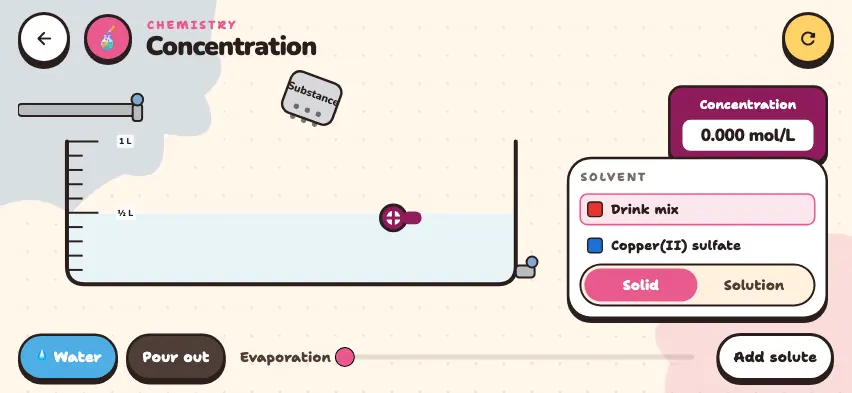
How do you use the simulator?
- Choose a solute from the list on the right. Scroll the list to see all 8 substances. The solvent is always water.
- In Solid mode, press the Substance container above the beaker. Each press adds 0.25 mol of solute. In Solution mode, press the dropper to add concentrated solution.
- Read the value in the Concentration window. The concentration meter must be in the solution. If the solution level drops below the meter, a dash appears, so drag the meter down.
- Water is added while you hold down the 💧 Water button. It stops at 1 L.
- Solution pours out while you hold down the Pour out button.
- Drag the Evaporation slider to the right to evaporate water. Evaporation continues until you move the slider back.
- The Add solute button takes out all the solute and leaves pure water. The circular arrow button in the top right corner returns to the starting state.
Tasks to try in the simulator
- In Solid mode, add drink mix twice to ½ L of water. Then add water until you reach 1 L. Answer: First 0.5 mol ÷ 0.5 L = 1.000 mol/L, then 0.500 mol/L after you add water.
- Pour out half of the solution. Answer: The concentration does not change.
- Add potassium permanganate once to ½ L of water. Then add water. Answer: The concentration stops at 0.480 mol/L and crystals stay at the bottom. As you add water, the crystals dissolve, and at 1 L the concentration is 0.250 mol/L.
- Add copper(II) sulfate twice to ½ L of water and evaporate the water. Drag the concentration meter down. Answer: The concentration rises from 1.000 mol/L and stops at 1.380 mol/L, and crystals appear at the bottom.