What is molarity?
Molarity tells you how many moles of substance are dissolved in 1 liter of solution:
c = n / V
- c is the molarity, in mol/L
- n is the amount of solute, in moles
- V is the volume of solution, in liters
V is the volume of the finished solution, not of the solvent. That is why, in the lab, you dissolve the substance in a volumetric flask and add water up to the mark. If the volume is given in mL, convert it to liters first: 250 mL = 0.25 L.
| You know | You find | Formula |
|---|---|---|
| n, V | c | c = n / V |
| c, V | n | n = c · V |
| n, c | V | V = n / c |
| m, M, V | c | n = m / M, then c = n / V |
Worked examples
Example 1. You dissolve 0.2 mol of a substance to make 0.5 L of solution. c = 0.2 / 0.5 = 0.4 mol/L.
Example 2. You make 0.5 L of solution from 5.85 g of table salt. The molar mass M(NaCl) = 58.5 g/mol, so n = 5.85 / 58.5 = 0.1 mol. The concentration is c = 0.1 / 0.5 = 0.2 mol/L.
Example 3. How many grams of NaOH do you need to make 250 mL of a 0.2 mol/L sodium hydroxide solution? n = 0.2 · 0.25 = 0.05 mol. M(NaOH) = 40 g/mol, so m = 0.05 · 40 = 2 g.
Calculate molar mass from the atomic mass table.
Molarity vs. mass percent
Percent concentration tells you how many grams of substance are in 100 g of solution. Molarity gives the amount of substance in moles, so it is convenient for calculations with reaction equations.
Check the formula in the Nalukh chem app
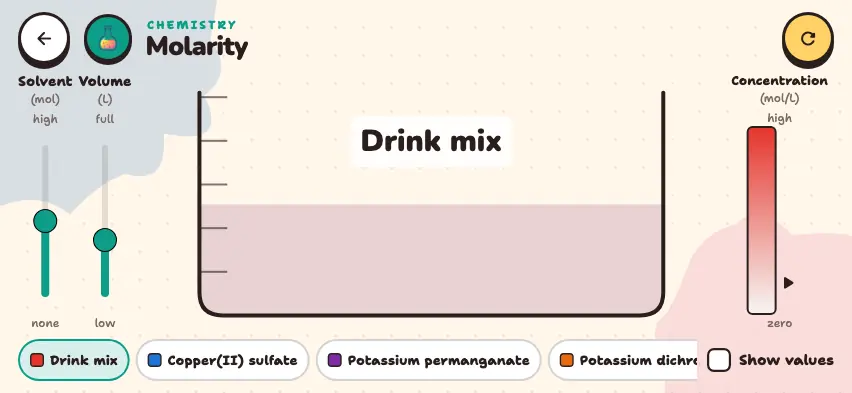
Change moles and volume with the sliders and see the concentration. This simulator is included with full access. Downloading is free, and 2 units and 5 simulators are open without signing up.
How do you use the simulator?
- Choose a solute from the bottom row. Scroll the row to see all 8 substances.
- Check the Show values box. A number appears under each slider, and a value appears under the concentration.
- Use the left slider to change the amount of solute from 0 to 1 mol.
- Use the Volume slider to change the volume of solution from 0.20 to 1.00 L.
- Watch the pointer on the Concentration bar on the right. The color of the solution in the beaker changes too.
- If the concentration goes past the substance's saturation limit, Saturated appears and a precipitate forms at the bottom.
- The circular arrow button in the top right corner returns to the default settings.
Tasks to try in the simulator
- Choose drink mix and set 0.50 mol and 0.50 L. Then change the volume to 1.00 L. Answer: The concentration goes from 1.00 mol/L to 0.50 mol/L.
- Find the highest concentration with drink mix. Answer: 5.00 mol/L at 1.00 mol and 0.20 L.
- Choose potassium permanganate and set 0.24 mol. Slowly lower the volume from 1.00 L. At what volume does Saturated appear? Answer: when the volume drops below 0.50 L, because the limit for this substance is 0.48 mol/L.