What is Beer's law?
When light passes through a colored solution, part of it is absorbed. Beer's law calculates this absorption:
A = ε · l · c
- A is the absorbance, a number with no units
- ε is a constant that shows how well the substance absorbs light. It depends on the substance and the wavelength
- l is the path length, the distance light travels through the solution. It equals the thickness of the cuvette
- c is the concentration of the solution
Transmittance is the percentage of light that passes through the solution. As absorbance rises, transmittance falls, but not in a straight line:
| Absorbance | Transmittance |
|---|---|
| 0 | 100% |
| 0.3 | about 50% |
| 1 | 10% |
| 2 | 1% |
Each time absorbance goes up by 1, the transmitted light drops by a factor of 10. Absorbance, not transmittance, is directly proportional to concentration.
Why do solutions look colored?
A solution absorbs light of certain wavelengths and lets the rest pass through. The color you see is the color of the transmitted light.
| Solution | Color you see | Light absorbed | Simulator wavelength |
|---|---|---|---|
| Potassium permanganate | purple | green | 540 nm |
| Potassium dichromate | orange | blue | 450 nm |
| Potassium chromate | yellow | violet | 430 nm |
Sodium chloride solution is colorless because it does not absorb visible light.
Where is the law used?
In the lab, you use a colorimeter to measure the absorbance of several solutions of known concentration and make a graph. Then you measure the absorbance of an unknown solution and find its concentration from the graph. The law works well for dilute solutions. In very concentrated solutions, the straight-line relationship can be lost.
Measure light absorbance in the Nalukh chem app
Change the concentration, thickness, and wavelength and measure the absorbance. This simulator is included with full access. Downloading is free, and 2 units and 5 simulators are open without signing up.
How do you use the simulator?
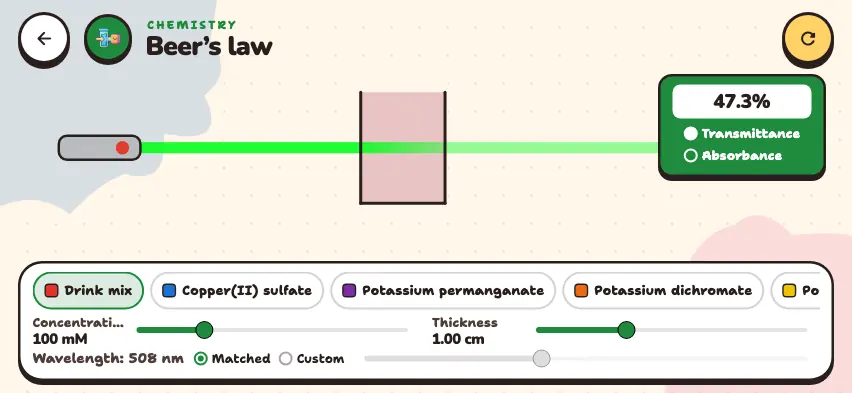
- Choose a substance from the row on the bottom panel. Scroll the row to see all 8 substances.
- Use the Concentration slider to set the concentration. The upper limit is 100–400 mM, depending on the substance. 1 mM is 0.001 mol/L.
- Use the Thickness slider to change the cuvette thickness from 0.50 to 2.00 cm.
- Choose the wavelength. With Matched, the laser is set to the wavelength the substance absorbs best. With Custom, you change it with a slider from 380 to 700 nm.
- Read your measurement on the upper right panel: Transmittance appears as a percentage and Absorbance as a number.
Tasks to try in the simulator
- Read the Absorbance value at the default settings. Change the concentration to 200 mM and read it again. Then change it to 100 mM and set the thickness to 2.00 cm. Answer: 0.325, 0.650, and 0.650 again.
- Repeat the same steps with Transmittance. Answer: It goes from 47.3% to 22.4%. Absorbance doubled, but transmittance did not drop to exactly half.
- Choose potassium permanganate at 100 mM. Read the transmittance with Matched. Then choose Custom and set 650 nm. Answer: It goes from 5.0% to about 98%, because red light passes through this solution with almost no absorption.
- Change the concentration of sodium chloride. Answer: At any concentration, transmittance is 100.0%.